en


Winbox runs as a phone app, and the login screen inside that app is the only place a UID and password belong. This page covers both halves of the problem. If you are signing up, it walks through the OTP flow and the UID format rules. If you are already locked out, it lists the usual causes of a failed Winbox login and the exact menu path that fixes each one.
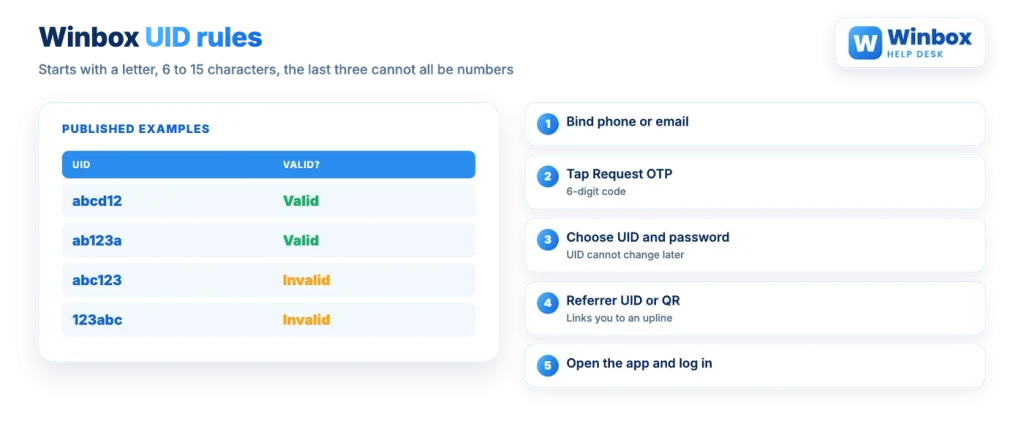
Registration starts by binding a contact method. You enter a phone number or an email address, request a one-time code, and prove you control that contact before the account exists. Only then do you pick the login details you will use from that point on.
The referrer step needs a word of explanation. A referrer UID, or the QR code that carries it, attaches your new account to an upline in the referral structure. In general, referral systems exist so that the person above you earns a share of activity below them, and Winbox publishes a daily downline rebate of roughly 0.1% to 0.3% for an upline. The practical effect for you is narrower: bonus offers are run by the referrer who registered you and claimed through that referrer’s customer service, so two accounts opened under different uplines may not see the same promotions at all.
A UID must begin with a letter from a to z, run 6 to 15 characters, and must not end with three numbers in a row. In practice, adding three digits to the end of a short name breaks it.
| UID | Valid? |
|---|---|
| abcd12 | Valid |
| ab123a | Valid |
| abc123 | Invalid |
| 123abc | Invalid |
Read the two invalid rows together and the logic is clear. abc123 fails because the final three characters are all digits. 123abc fails because it opens with a number rather than a letter. Mixing letters into the tail, as in ab123a, keeps the name acceptable.
Choose carefully, because a UID is used once and cannot be changed after creation. Everything else about the account is adjustable later: the password, the Payment PIN, the bound phone number. The login name is not. It is also the identifier other players see when points are transferred, and it is tied to what your UID means for rebates and QR sharing.
Work through the symptom rather than guessing. Nearly every cause below is fixed from the login screen itself or from the Me section of the app.
| Symptom | Likely cause | What to do |
|---|---|---|
| UID not recognised | A typing slip, or the wrong one of several accounts | Re-enter it slowly; it starts with a letter and runs 6 to 15 characters. If it still fails, tap Help and choose Forget UID |
| Password rejected | Wrong password, or stray capitals from the keyboard | Retype it, then use Help and Forget password to reset by OTP |
| OTP never arrives | As a rule, weak signal, a full inbox or a delayed network message | Wait a short while, check coverage, then request the code again |
| OTP goes to an old number | The bound phone number is no longer yours | While still logged in, go to Me, Edit Personal Information, then Mobile No. |
| A web page asks for your UID and password | You reached a look-alike sign-in page, often from a message or an ad | Close it without entering anything. If you already did, change the password from inside the app |
| Nothing loads on a laptop | There is no desktop version | Sign in from the phone app instead |
Two of those rows deserve more than a table cell. Several websites present themselves as the official home of Winbox, and the brand itself works through the app and through agents, so a browser page offering a login box is not something to trust by default. Check the address bar before you type anything, and treat any page you reached from a forwarded message as unsafe. Your UID, password, OTP and Payment PIN have no reason to be typed anywhere except inside the installed app.
The other row is the phone number. Because password and UID recovery both run on a one-time code, a dead number becomes a locked account. Update it while you still have access.
Both recovery routes sit behind the same button. On the login screen, tap Help, then pick the problem.
Before you continue
No Winbox customer service agent will ever need your OTP or your Payment PIN. Those two codes exist to stop other people acting on your account, including anyone who contacts you claiming to help with a login problem.
If the recovery code itself does not arrive, the account contact details are the thing to check, not the password. Support is published as available 24/7 through live chat, and a contact that no longer matches the account is the sort of thing only Winbox customer service can look at.
It is easy to assume the login password also authorises money movement. It does not. The password opens the account. The 6-digit Payment PIN is a second confirmation, entered when you submit a withdrawal or transfer points to a friend, and it can be changed from Settings. A one-time OTP is temporary and only proves, once, that you control the bound phone or email.
Keeping them separate is the point of the design. Someone who learns your password still cannot push a withdrawal through without the PIN, which is exactly why neither the PIN nor an OTP should ever be shared, screenshotted or read out to anyone.
The published position is plain: only the phone application version is served. No desktop client exists, which means a browser sign-in page for Winbox should be read as a look-alike rather than a convenience. Android installs come from an APK rather than Google Play, and the published iOS routes are TestFlight or a home-screen shortcut added through Safari, so getting installing the app right matters more here than on a platform with a store listing.
That app-only design also explains why so much sits behind the Me menu: the wallet, the account tools, the friends list and each game provider all live in one place. If the layout is new to you, start with how the app is organised and the login screen will make more sense.
Sign-up and sign-in both happen in the app, using the phone number or email you bind at registration.