en


A held payout typically comes down to one of three things: second verification not finished, a deposit that has not been played through, or a bank name that does not match the account. This page follows the Winbox withdraw flow in the order the app asks for it, starting at the first top up and ending at the approval queue.
Every figure below is one the Winbox sites publish. Your own balances, rates and provider limits are shown inside the app, and no payout is guaranteed.
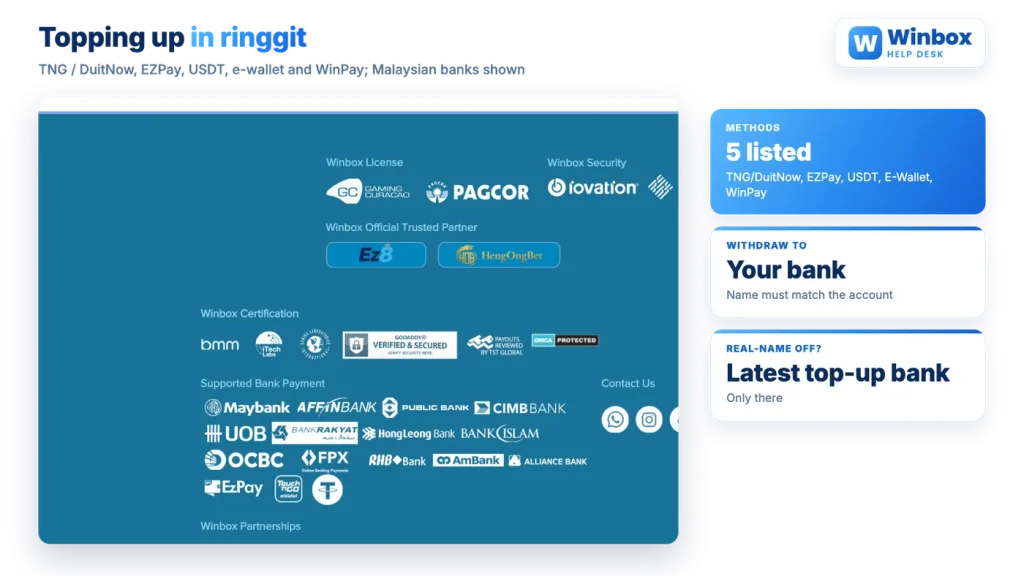
Funding happens in the app, through a wallet that holds your balance in MYR. A separate USD wallet exists for USDT. The published top-up methods are TNG/DuitNow, EZPay, USDT, E-Wallet and WinPay, and the payment area also displays marks for Malaysian banks such as Maybank, CIMB, Public Bank, RHB and Hong Leong, alongside FPX.
| Method as listed | What it generally means |
|---|---|
| TNG/DuitNow | Transfer from a Malaysian e-wallet or bank through the DuitNow rail |
| EZPay | A payment gateway option offered at the cashier |
| E-Wallet | Payment from an e-wallet balance rather than a bank account |
| WinPay | A further payment option listed at the cashier |
| USDT | Crypto funding into the USD side of the wallet |
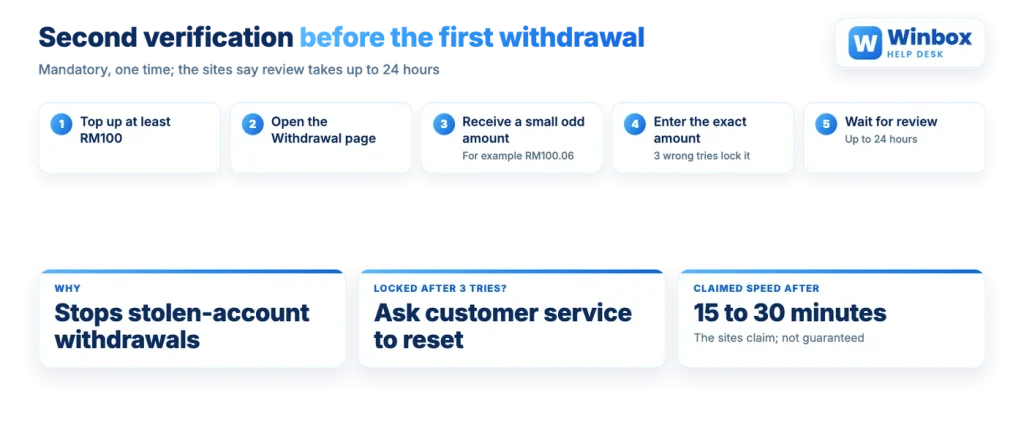
Two amounts matter more than the method you pick. Second verification needs a top up of at least RM100, so a very small first deposit can leave you unable to withdraw yet. The first-recharge reward attached to real name authentication needs at least RM20 and counts only bank transfer top-ups.
Minimum amounts for each individual method are not published anywhere, so treat the cashier screen as the authority. The same goes for any cost: the terms allow reasonable deposit and withdrawal charges, without listing them.
Once there is a withdrawable balance, the sequence is short:
The Payment PIN is the second gate on every transfer and payout, which is why it exists separately from your login password. If you have never created one, or need to change it, start with setting your Payment PIN before you try to withdraw anything.
Two rules in the terms sit behind that approval step. Funds are not released if the full deposit has not been played through, and withdrawals are paid in the currency you deposited. The name on the receiving bank account has to match the name registered on the account.
Second verification is a one-time two-step check, and it is mandatory. No withdrawal is approved until it has passed, which is why a first payout request can stall. The idea is simple: you receive a small odd amount, and you prove the account is yours by reporting that figure back exactly.
Three wrong entries lock verification. At that point the app will not let you try again and the lock has to be lifted by customer service, so check the received amount character by character before each attempt.
If the step fails without locking, the published advice is to check your connection, check the personal details on the account, and check the amount again. A mismatch of one sen is still a mismatch.
Winbox real name authentication is not compulsory, but skipping it costs more than it seems, because the features it unlocks are the ones you look for later. Without it you cannot transfer points to a friend, receive points from a friend, or add friends at all. The stated purpose is to stop fraudulent use of the payment accounts behind the app.
It also changes where your money can go. Without authentication, a bank account in any name can be used to top up, but withdrawals are paid only to the most recent bank account used for a recharge. In other words, the last account you deposited from decides your payout destination.
Each UID binds to one real name authentication. As published, the same bank account can be bound to an unlimited number of UIDs, and company-name bank accounts are accepted, while the terms separately state one account per person. Both statements stand as written, so if you hold more than one UID, ask customer service before assuming anything about promotions.
Authentication also carries a first-recharge reward, available once per bank account that has been bound to it, with a minimum top up of RM20. After authentication, only bank transfer top-ups qualify for that reward: Instant Top Up and ATM cash deposits do not. Reward amounts are set in the terms you were given, so read those rather than a headline, and check the bonus turnover rules before you assume credited money can be withdrawn.
The crypto route lives in the USD side of the wallet and has its own screen:
The screen shows two figures: the chip laundering amount and the amount that will be credited, so read both before confirming. A note function keeps the record of the transaction.
Network choice is the part that is unforgiving. As a rule with USDT, the protocol you pick has to be one your receiving wallet or exchange supports, because a transfer sent on the wrong network is not recoverable by the sender. Copy the address rather than typing it, and send a figure you can afford to test with first if the destination is new to you.
Stated
Withdrawals finish within 15 to 30 minutes, and up to about an hour at peak times, with amounts in multiples of RM100 such as 100, 200 and 500 suggested.
In practice
Nothing is processed until second verification has been approved, and the sites themselves put that first review at up to 24 hours. After that, each request still waits in an approval queue, and funds are only released once the deposit behind the balance has been played through.
So the realistic picture is two different clocks. The first withdrawal is paced by verification and review. Later ones are paced by approval, and the published 15 to 30 minute window is the operator’s own claim about that stage, not a commitment you can hold anyone to.
Requesting in multiples of RM100 is advice from the same source rather than a rule in the terms. It does no harm to follow it.
When a request sits unprocessed, work down this list before contacting support:
Customer service is reachable from inside the app and, by its own statement, runs around the clock in several languages. If you are still mapping out where each of these settings sits, the overview of how the app is organised shows which menu holds the wallet, the verification page and the account details.
Second verification is one-time, and it has to be completed in the app before a first payout can be approved.